Kagi Assistant
This week's release brings several big updates to Kagi Assistant, laying the groundwork to exciting new chapters ahead.
Introducing tags
Tags let you organise your Kagi Assistant threads. Each thread can have multiple tags.
- You can use the
Temporary tag to mark any thread as temporary, and it will auto-delete 24h after its last update.
- If you use Kagi Assistant in 24h mode, all new threads will be tagged as
Temporary by default. When you remove the Temporary tag, that thread will be saved.
- When you create a thread while viewing a specific tag, the new thread will automatically inherit that tag.
- Threads without a custom tag, such as all your currently saved threads, appear in the All folder.
Learn more on our help page.
Bulk managing threads
We've also made thread management easier: select multiple threads and either tag them or delete them permanently.
[upl-image-preview url=https://kagifeedback.org/assets/files/2025-07-31/1753986178-528658-image.png]
Model picker
The model picker now features a curated set of base models that we believe deliver the strongest performance, helping you choose the best option for your specific task. We continuously update this list using our own in-house benchmarking.
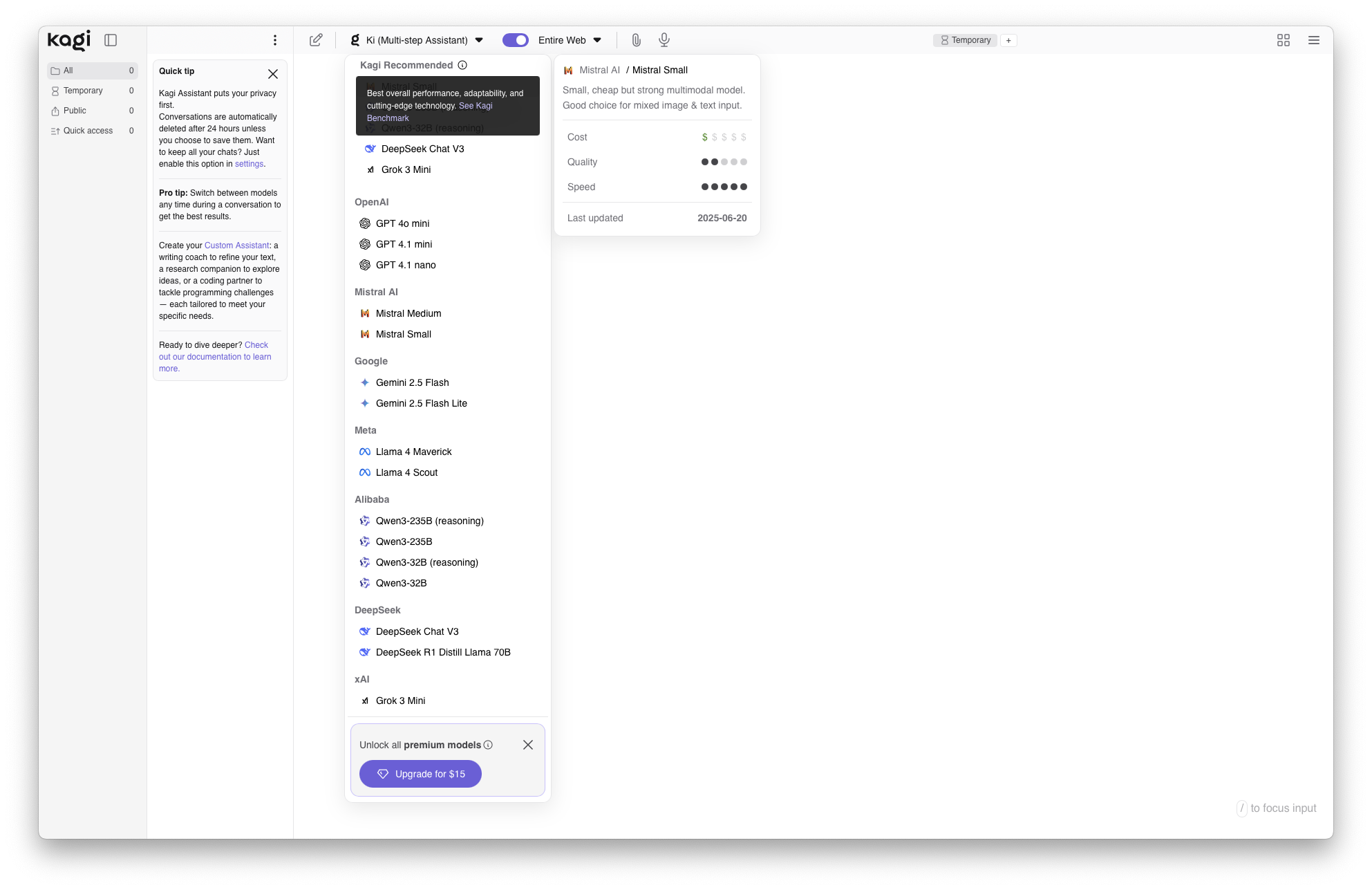
Define your default Assistant
You can now define your default Kagi Assistant model, as either one of your Custom Assistants, a base model or the last used model. Every new thread you create will start with that default model.
Removal of context windows limits
Kagi Assistant no longer enforces context window limits. We include all available information, and if we reach the model’s maximum size, we carry forward relevant context so it remains available for your next instructions.
Plus many other fixes and improvements
Kagi Search
As we gear up for important updates, this release brings a round of improvements and bug fixes,
Kagi Maps
- More precise results when interacting with map POIs
- Merging of information from multiple sources in search results
Fixes and improvements:
Kagi Android app
Our latest release introduces several quality-of-life improvements, including
- Added a Kagi Assistant button right in the native search screen: faster access, less tapping #7166 @COValhalla
- Fixed: tapping 'x' no longer clears your bottom search bar #7677 @yk
Kagi on Socials
Here is this week's featured social media mention:

Tag our accounts or use #Kagi when mentioning us in your posts!
Kagi around the web
- Kagi was featured on a list of "Smarter Search Engines to Try in 2025" by PC Mag:
"Good for research, it offers outstanding control over your results, including letting you favor specified domains over others."
- French tech site Clubic featured an interview with Vlad about 7 reasons to try Orion. Read with Kagi Translate here.
- Cory Doctorow gave Kagi another shout out in a post about Google's declining quality and spam results:
"It's been more than a year since I gave up on Google Search (I switched to Kagi.com and never looked back). I don't miss it."
