Kagi Maps
We're continuously improving Kagi Maps, and with the latest release we've added a new data layer: Popular Areas. It highlights the busiest and most frequented spots when you're exploring a new city.
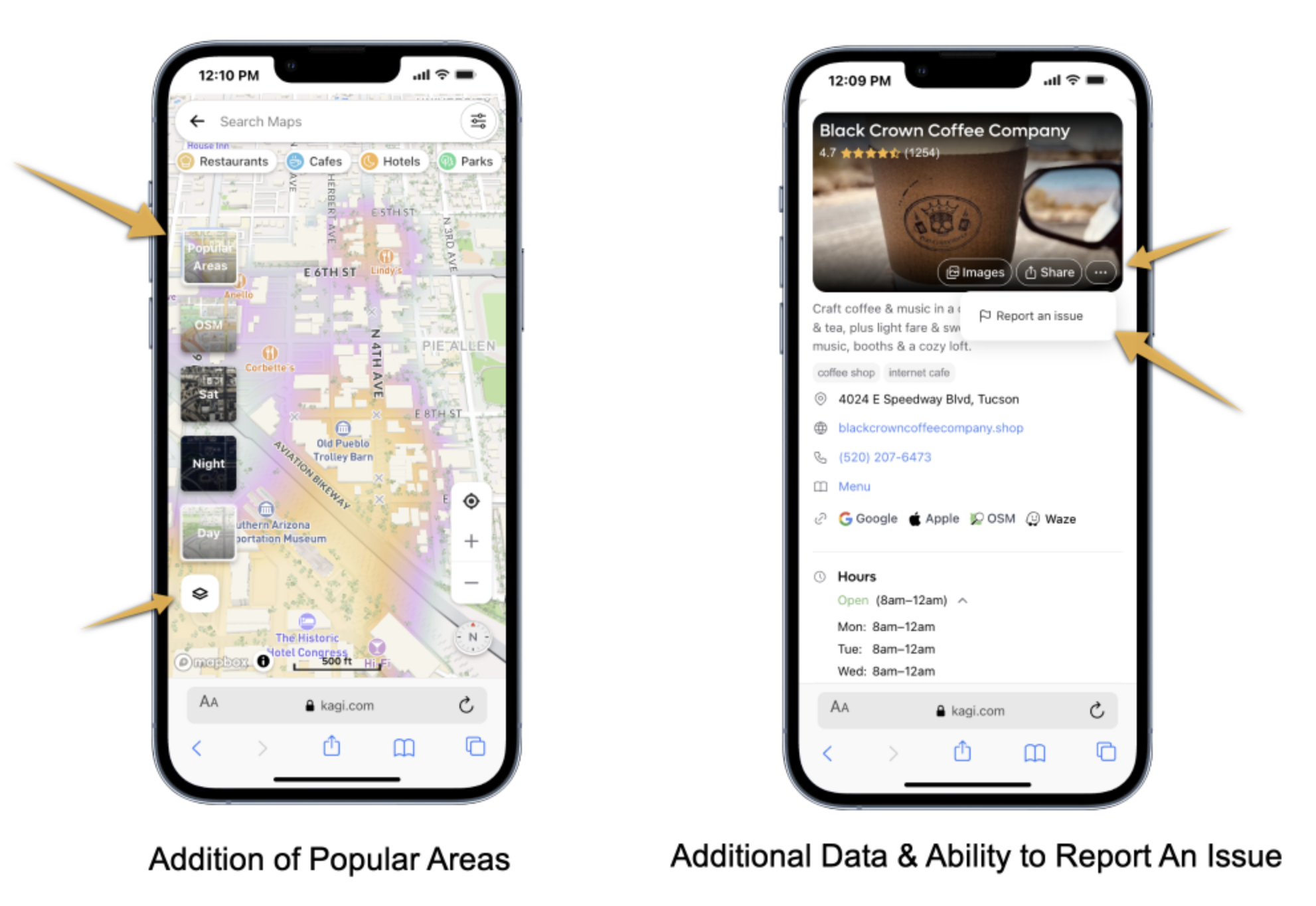
New Global Map Layer:
- Highlights most popular areas where people congregate near Cafes/Restaurants/Shops/Cultural-Centers
POI Infoboxes have more 3rd party external links:
- OpenStreetMap, Wikipedia, Google Maps, Apple Maps
- Reviews on Yelp and TripAdvisor
- Social media profiles (Facebook, Instagram, Twitter)
- Reservations via OpenTable
- easier-to-read opening hours with weekly schedules
- Direct links to restaurant menus when available
Strengthening ties to OpenStreetMap Community:
- with ability to Report Map Issues to OpenStreetMap directly. A new "Report an issue" option in Infobox connects you to OpenStreetMap's note system, where you can flag errors or suggest improvements to the underlying map data.
Additional Map Data:
- POI data now preloads in the background for faster navigation when clicking markers or search results
- Mobile-optimized zoom controls for smoother touch interaction
- Sorting preferences (distance, rating, price) now persist across sessions
- Faster POI on click load-times with use of shorterm caching
- Middle-click support on search results and sorting buttons
Various ad-hoc bug fixes and database improvements:
- Improved caching system for POI data reducing redundant API calls
- Better location cookie handling using
kagi_precise_location
- Various improvements to our POI-matching algorithms
- UI rendering fixes
Kagi Search
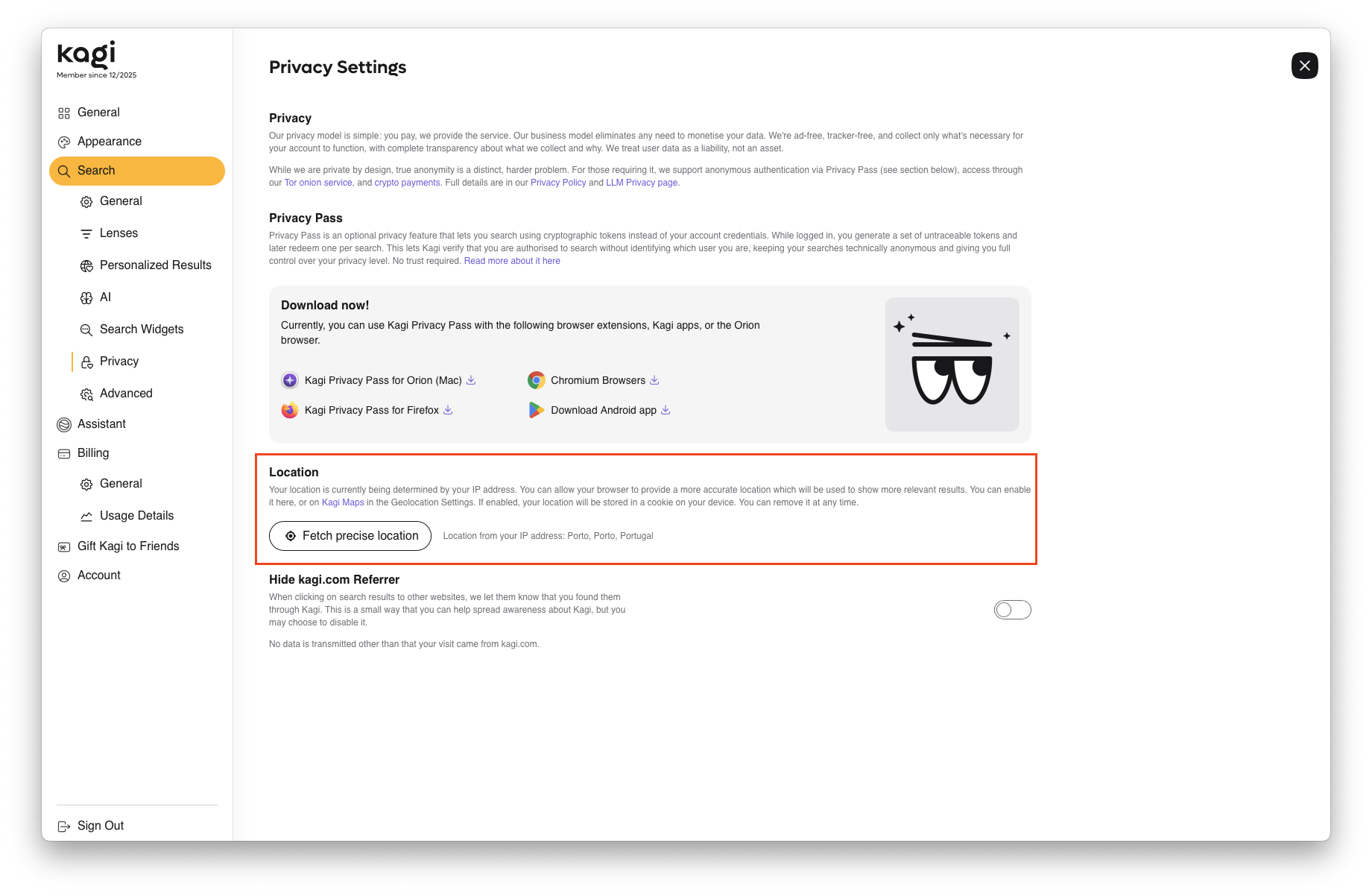
- Location management is now available in settings, where you can view and update your location at any time. Kagi uses either a coarse location estimated from your IP address or, if you opt in, your device's precise location. This is stored only on your device as a cookie. It supports local-intent searches (e.g. "petrol stations near me") and sets the initial map position in Kagi Maps.
- Incorrect geoip location #9194 @klandarey
- Searching for 'Pop! OS (System76)' redirects to incendar.com #9053 @gigabit-jack
- Summarizer fails on all YouTube videos, "Sorry, no transcript could be found for this video." #9278 @urrlich
- Kid accounts cannot select a companion. #9246 @leuchtthurm
- Quick answer responds in Indonesian, despite results being English #9237 @zq40000
- Can't get to the consumption page from a team plan account #7265 @Thibaultmol-kagi
- Add an indicator to the shield for websites marked by Surveillance Watch #8912 @pma_snek
- !tr as the regional bang for Turkey #6376 @GERGE
- Quick Answer shifts layout on mobile #9171 @hmnd
- Context menus for inline news and videos are stuck inside the frame #9127 @pma_snek
Kagi Assistant
You can now effortlessly navigate your threads and jump to specific messages with our new thread scrollbar.
- We've made the following model upgrades:
- Grok 4 Fast and GPT 5 have been updated to their latest versions
- Retired Mistral Medium in favor of Mistral Large
- Add a column to the Custom Assistants settings table that displays each assistant's associated bang #7440 @jogojapan
- Kagi Mobile Assistant: Tapping or holding a model name should prompt the model info box #8023 @__
- Claude output cut off around 6500 tokens #9265 @igakagi
- When using Web Access, Kagi Assistant searches too few sources #6149 @Mar
- Buttons to quickly jump between chats in an Assistant thread #9232 @brrrendan
- Right click on highlighted text cause thinking, search, plan and etc to expend #9117 @rxzlion
- Assistant using 2024 as the search year in 2025 #8350 @blackbird2150
- Update Grok Fast to 4.1 #9190 @mitch
- Sharing page for Assistant broken #9176 @catwars
- Research Assistant image generation should allow you to specify higher resolution than 1024x1024 #9156 @jmp242
- Navigating between versions of the same prompt is broken with 3 prompts after page reload in Kagi Assistant #7134 @bsamek
Post of the week
Here is this week's featured social media mention:

We truly appreciate your support in spreading the word, so be sure to follow us and tag us in your comments!
Is your browser a rat?
Check out this fun video we made for Orion. We also made this comic in collaboration with artist Chaz Hutton to show why we built Orion to be your trusted daily companion for the web:

End-of-Year Community Event
Join us tomorrow, December 19, at 09:00 PST (convert to local time) for Kagi's annual community event, covering major updates, launches, and what's next. Plus live Q&A with the Kagi team. Register via Zoom. Looking forward to seeing you there!
