I am the colleague in question 😃 Here's some details, hoping it helps:
- OS: Windows 11 24H2, Build 26100.3775
- Browser: Chrome 135, 64bit (with a few extensions) --- Note: in incognito mode it does work. In Firefox it also does work.
- The translate.kagi.com page doesn't see me as logged in, but if I click "Log in" I go to a page where I do see that I'm signed in.
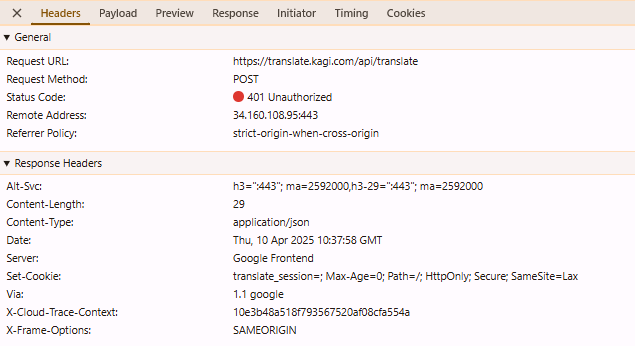
In my network tab I see a failed (401) POST to a translate endpoint. Here's the request copied as a curl command from the browser dev tools:
curl 'https://translate.kagi.com/api/translate' \
-H 'accept: */*' \
-H 'accept-language: en-US,en;q=0.9,nl;q=0.8' \
-H 'cache-control: no-cache' \
-H 'content-type: application/json' \
-b 'kagi_session=RE.DACTED' \
-H 'dnt: 1' \
-H 'origin: https://translate.kagi.com' \
-H 'pragma: no-cache' \
-H 'priority: u=1, i' \
-H 'referer: https://translate.kagi.com/?from=auto&to=en&text=This+is+a+test.' \
-H 'sec-ch-ua: "Google Chrome";v="135", "Not-A.Brand";v="8", "Chromium";v="135"' \
-H 'sec-ch-ua-mobile: ?0' \
-H 'sec-ch-ua-platform: "Windows"' \
-H 'sec-fetch-dest: empty' \
-H 'sec-fetch-mode: cors' \
-H 'sec-fetch-site: same-origin' \
-H 'user-agent: Mozilla/5.0 (Windows NT 10.0; Win64; x64) AppleWebKit/537.36 (KHTML, like Gecko) Chrome/135.0.0.0 Safari/537.36' \
--data-raw '{"text":"This is a test","from":"en","to":"en","stream":true,"prediction":"","formality":"default","speaker_gender":"unknown","addressee_gender":"unknown","translation_style":"natural","context":"","dictionary_language":"en"}'
The response is a 401, here's the response details (sorry for the screenshot, not aware of an easy way to copy the text):
Hope that helps!
EDIT: I also notice it is preceded by a "401" response to a network request towards https://challenges.cloudflare.com/cdn-cgi/challenge-platform/............, and the red "Not authenticated" text bottom-left sits in the same place as the cloudflare "Verifying...." overlay I sometimes briefly see.