Kagi Support.
This issue is related a bit to a post I submitted back in 2024 (this one):
https://kagifeedback.org/d/4726-assistant-page-dont-load-correctly-on-firefox-esr-115-librewolf
I'm still on the same Windows 7 Pro PC at work (if only it didn't work flawlessly, I could get it replaced).
My issues now are related to accessing the Settings dropdowns using my Firefox ESR 115.24.0 browser (last version that works with Windows 7)
When I try to access any of these SETTINGS pages (which have dropdowns), like these:
https://kagi.com/settings/general
https://kagi.com/settings/appearance
https://kagi.com/settings/search
https://kagi.com/settings/assistant
etc...
I cannot activate any of the dropdowns to see and select what's inside those dropdowns.
Pretty sure this is because Kagi's relying on setPointerCapture() and releasePointerCapture() APIs for functionality. Firefox 115 ESR's internal dropdown handling still uses the deprecated Element.releaseCapture() method.
My hope (plea) is that maybe the devs there would be willing to write in some backwards compatibility accomodations to help me to get to these dropdowns from work.
A few possible solutions:
(a) Fallback dropdown implementation for older Firefox versions (like mine, which use traditional mouse event handling instead of the pointer capture APIs)
(b) Polyfill integration (so as to provide missing pointer capture functionality for legacy browsers like 115.24.0)
I realize 100% that adding in code for "dinosaur" configs like mine isn't the most hot or urgent stuff on the TO DO list, but I'd just like to have some fallback to let me get into these settings from work.
Anyways, thought it would not hurt to plead my case, and ask!
Thanks for at least reading this (and hopefully, helping an Early Adopter loyal user out!)
😉
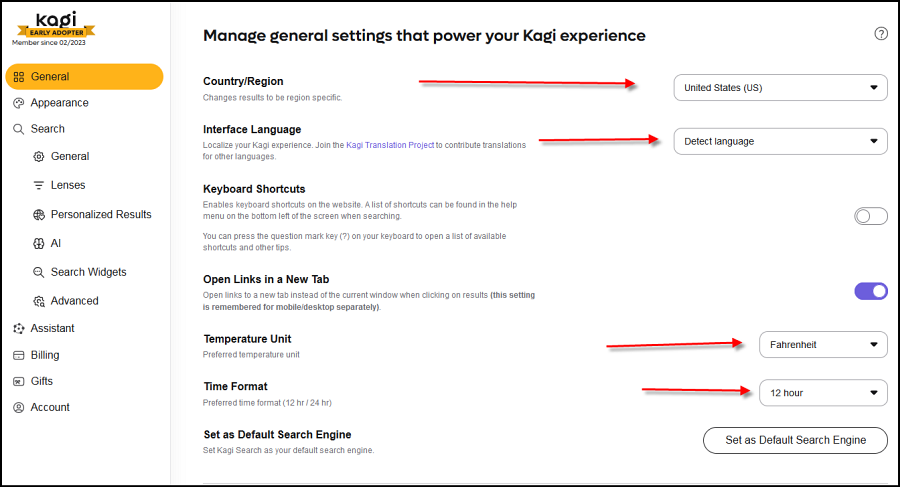
to have dropdowns work in my legacy Firefox ESR 115.24.0 browser (as explained above).
