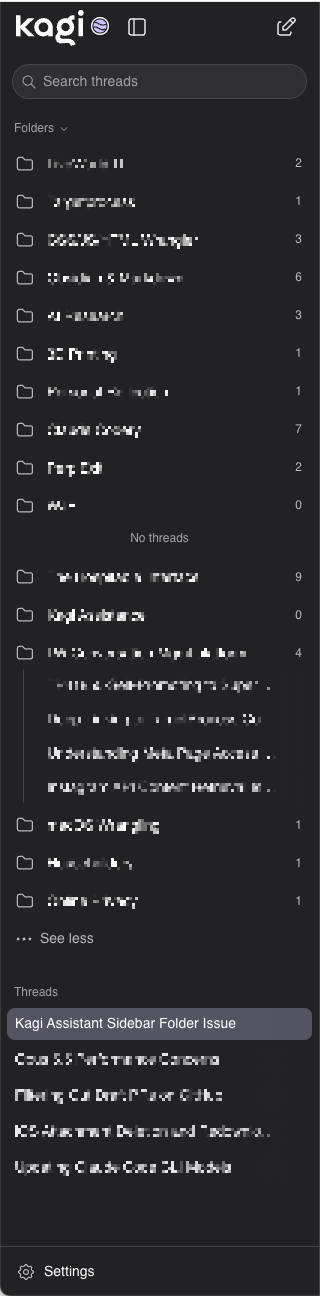
In the Kagi Assistant sidebar, a folder with zero threads renders an empty-state label reading "No threads" as a centered, greyed-out, non-interactive line placed among the folder rows. It shares the column and vertical rhythm of the folder list but has none of a folder's affordances (no folder icon, no hover state, no click), so it reads as a section header/divider rather than as the empty state of the folder above it. Nothing about the visual language hints that it's referring to the containing folder.
Steps to replicate:
- Open Kagi Assistant with enough folders that the sidebar folder list is long.
- Ensure at least one folder in the middle of the list has zero threads (create a new empty folder, or let its threads expire under the default 24-hour retention).
- Open the sidebar folder list.
- Observe a centered, non-interactive line reading "No threads" rendered between folders that do contain threads.
Actual behavior: The "No threads" line appears mid-list, cannot be clicked, renamed, or dismissed, and is visually indistinguishable in function from a section header.
Screenshot attached.
It's OK to indicate that the user has opened an empty folder. Not necessary, but can be useful.
It should not be typeset like a section header. Instead, consider setting it in italic, dimmed, left-aligned and the same font-size as a thread title: