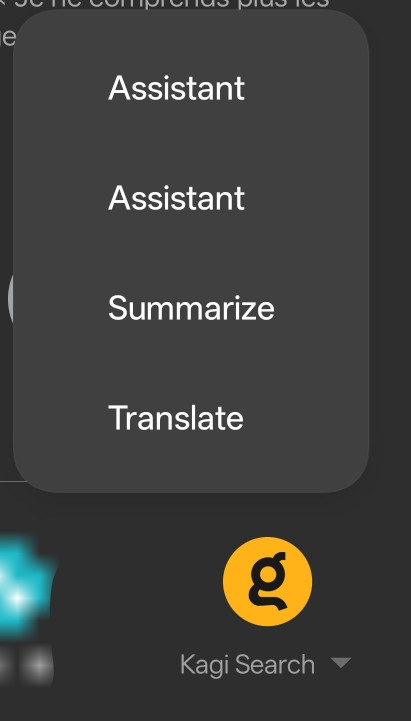
When using Android's native share functionality to send text to Kagi Search, the share target options display incorrect labeling.
Steps to replicate:
- On any Android app, select/highlight text (e.g., in a browser, notes app, or messaging app)
- Tap the "Share" button to open Android's system share menu
- Select "Kagi Search" from the available share targets
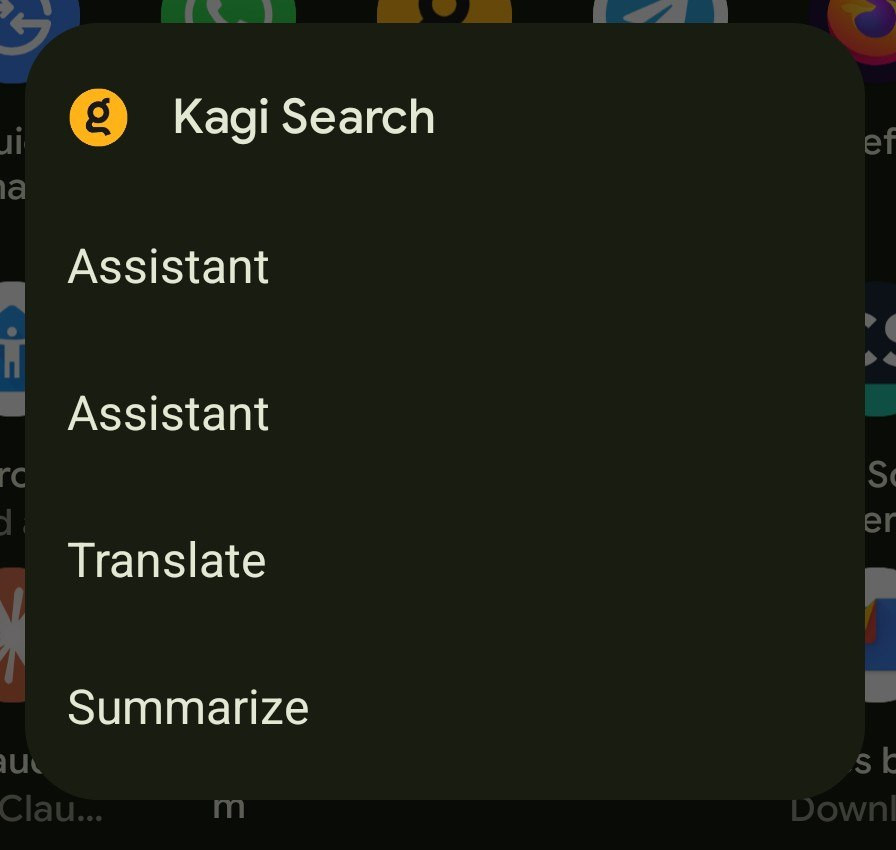
- Observe the four options presented: "Assistant," "Translate," "Summarize," and "Assistant"
Observed behavior: The first option labeled "Assistant" actually performs a search query, while the last option labeled "Assistant" opens the AI Assistant feature. This creates confusion as both options appear with identical labels but perform different functions.

The share menu should display four distinct and clearly labeled options:
"Search" - performs a web search with the shared text
"Translate" - translates the shared text
"Summarize" - summarizes the shared text
"Assistant" - opens AI Assistant with the shared text
Each option should have a unique, descriptive label that accurately reflects its function, eliminating ambiguity and allowing users to quickly select the appropriate action for their shared content.