The text selection in Kagi Translate does not work correctly.
If a phrase like "Happy Birthday to you" is written in the left input field (the field getting translated) I can not use double- or triple-click with the left mouse button as expected.
For example double clicking on the word "Birthday" should mark this word but instead the part "Happy Bi" gets marked.
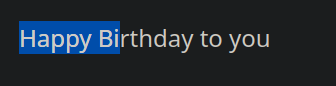
When triple-clicking, the whole phrase gets marked as expected, but I cannot delete it all using the Backspace button.
Using Keyboard shortcuts such as Ctrl+A does work correctly.
On a new private tab the issue did not show up, after logging in it showed up again.
The URL used to test: https://translate.kagi.com/?text=Happy+Birthday+to+you&to=de&from=auto
The select functionality should work as expected whether logged in or not.
