Kagi Search
- More intuitive icon to represent a result from the Kagi-index #5800 @sw
- When searching "macos", "acos" is interpreted as a calculator expression #6860 @synapse
- Zapier integration preventing correct selection of "takeaway", instead forcing "takeaways" #5336 @TimMilazzo
- Website Security and Configuration Check for KagiSuggest.com #6937 @xx
- Microsoft Bing retiring Search API - What does that mean for Kagi? #7107 @[deleted]
- Some channel names don't appear in video searches #5894 @Thibaultmol
- Billing Period Tooltip is Partially Hidden #7105 @Hanbyeol
- Custom bangs' exclamation mark order not working #7096 @dreifach
- Kagi Summarizer extension popup is "hard to read" #7131 @Vapid
- Kagi Summarizer browser extension should support dark mode #5179 @mojolobo
- Typo in recent news #6938 @yarnaid
- Unofficial Mullvad website showing in results #6902 @xx
- Using bangs with search suggestions doesn't use the search suggestions #6545 @gustav
- On/off switch for redirects #1326 @Naymul
Kagi Assistant
- New models dropped, Ultimate users now get access to Claude 4, Mistral Medium, Qwen 3 (30B, 235B), and OpenAI o3
- No gpt o3 #6888 @artem
- Kagi assistant - return broken hangul(korean alphabet) #6029 @dungsil
- Keyboard pops up after every assistant message #6946 @fxgn
- Quick Answer generating innacurate and NSFW responses #4595 @Corvana
- 3.7 Sonnet (extended thinking) not following custom instructions #6954 @dreifach
- New Assistant layout causes "submit" if you open a menu #7039 @Thibaultmol
- Don't open keyboard after selecting thread in assistant (on mobile) #7043 @Kiito
- Kagi Assistant redirect to signin page instead of help.kagi.com #7124 @0xGingi
- Group saved threads by time period in Assistant sidebar #6680 @bausauce
- !chat bang throws an error after yesterday evening's update #7046 @m2jest1c
- Images found by Ki image search give CORS errors before image proxy #7062 @Thibaultmol
Kagi Android app
Search from the Kagi widget is now WAY faster 🚀 Plus, we've squashed bugs and added some handy features:
Kagi Translate
- Translation quality and speed improvements for best and standard modes
- Word dictionary now shows synonyms
- Proofreading mode, shows list of corrections with explanations, style and repetition analysis
- Page height on mobile devices is too large, causes unwanted scrolling #7074
- Custom CSS applying with setting disabled, system theme not respected on page load @electric_eel_maki
- Preserve text while switching between modes @nichu42
- Suggest to switch input language if selection doesn't match the detected one @vaartis
- Pressing enter while in the language selector should pick the first option @bert
- Add UK and US english as different options in the dropdown #7148 @Anonymous22
- Ctrl+a selects all text on macOs #7095 @laiz
- Kagi Translate refuses to translate NSFW text #7059 @ZK
- Kagi Translate mobile layout is suboptimal #6878 @DeeKahy
- Text overlapping on iOS/PWA #7045 @dartcircle
Kagi's Japan trip
A look into Kagi's trip to Tokyo, where we connected with the Kagi community, collaborated with local companies and potential partners, and enjoyed everything the city has to offer. A heartfelt thank you to everyone who met with us, shared meals, and made this experience unforgettable!
また次回お会いしましょう。

Or view on PeerTube here.
Kagi on Socials
This week's featured social media post:

Tag our accounts or use #Kagi when mentioning us in your posts!
Kagi in the News
- German tech site Golem featured an article about Kagi being much more than just a Google alternative. Read with Kagi Translate.
- French tech site Just Geek featured an article about Kagi's many features and how it might make you "forget Google." Read with Kagi Translate.
- OMG Ubuntu covered Kagi's Orion Browser and its usage of GTK4/libadwaita for its Linux launch.
- Kagi Assistant was mentioned on Computer World's "20 genuinely useful AI apps for Android" list:
Beyond basic queries, its $25-a-month Ultimate plan includes access to something called the Kagi Assistant, which lets you access the underlying intelligence from Gemini, ChatGPT, Claude, and other AI engines in a single streamlined spot and with the added advantage of complete privacy and custom filtering to help refine the results.
- Liam Proven of The Register gives a shout out to Kagi in a piece about the enshittification of search:
Another option is to pay for your search engine. We've already mentioned Doctorow once, but his post about Kagi – a no-ads, no-tracking search engine with a tiered payment model – from a year ago makes interesting reading. The idea has gained traction with others, including Daring Fireball's John Gruber.
Kagi shout outs
- Kagi is described as being best for "power users and professionals who want fast, curated, ad-free results" in a post by Maple Web Design.
- Alan Jacobs shares a concise review of Kagi:
Google’s search results have become so bad that I recently subscribed to Kagi, and so far it’s been great.
- Have a site or blog and want to have an easier way to search through its archives? This post outlines a good use of Lenses to make that easier.
A Lens will focus Kagi’s search on one or more (up to ten) particular sites, date ranges, regions, keywords, or file types. You can also exclude sites or subsites. Kagi has several default Lenses, and you can add your own customized Lenses:
- Kagi is used as an example for why it's important to pay for what you love, and how it helps align the incentives between the user and the service provider:
In order for Kagi to make more money, they have to make search quality better. By adopting a subscription model, Kagi has fundamentally aligned the goal of the service with providing excellent search. This is why a subscription-based service is the most likely to keep its users satisfied over time, and why — if you care, and if you have the choice — you should choose to use a subscription-based service over other offerings.
- Along those same lines, Liu Miao writes about how paying for search offers a different perspective on using the internet:
Indeed, our generation grew up with the internet, and search engines have been free since their inception. Why pay to use one? But looking at it from another angle, if search engines have been free for over twenty years, then who has been paying for me all this time?
And noting specifically about Kagi:
I hope to see more products like this in the future—products that treat users as users rather than as products.
Industry News
The latest developments in the tech and search industries that captured our attention and reinforces our mission:

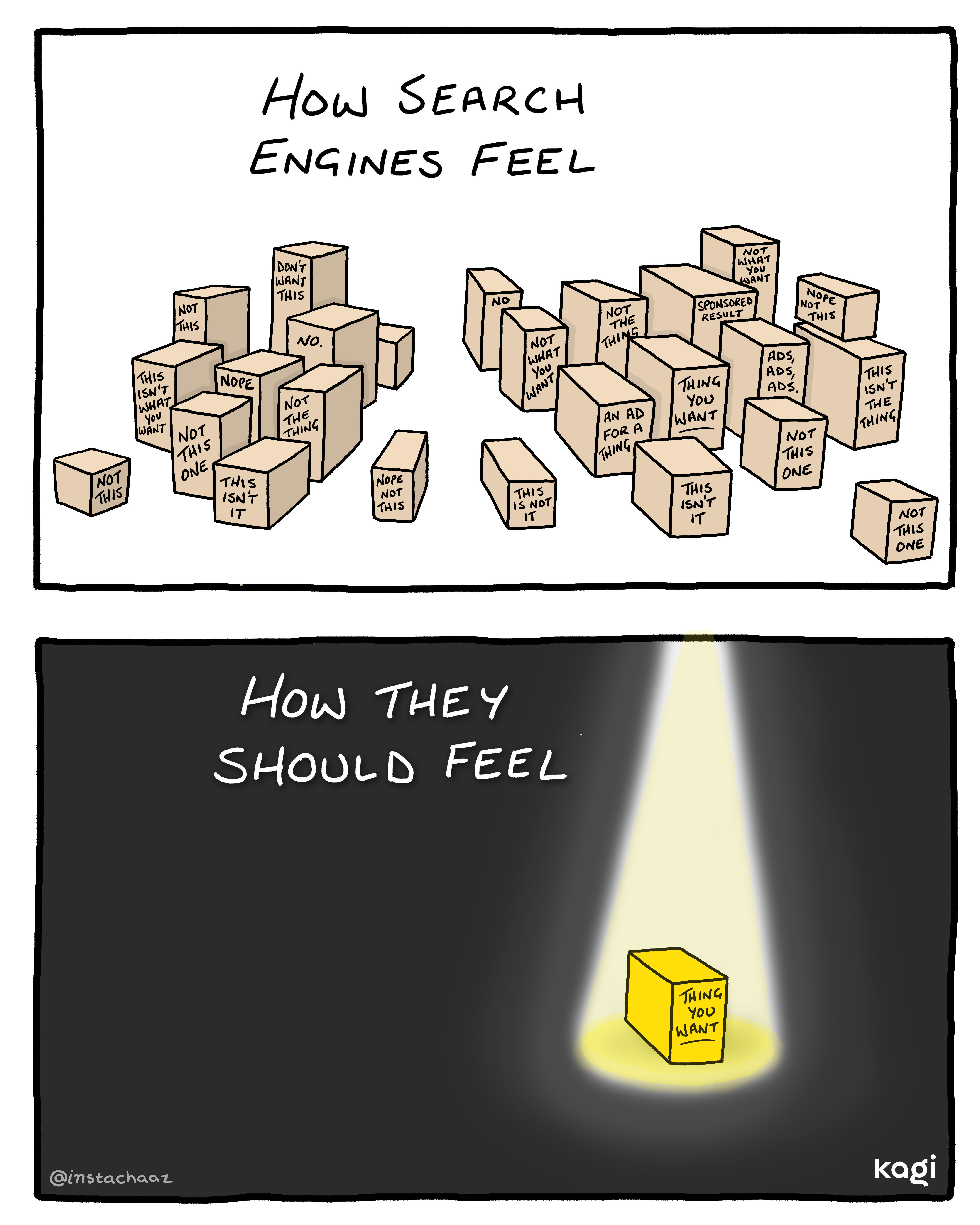
How search engines should feel
In collaboration with artist Chaz Hutton, this illustration captures how using a search engine should feel: straightforward and focused, guiding you directly to what you’re looking for.