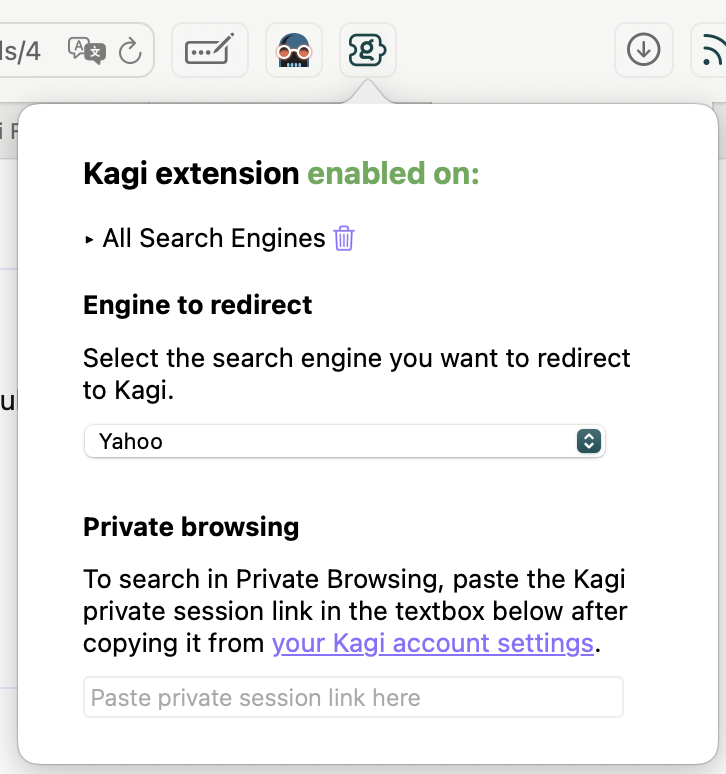
Thank you, @nobodywasishere - that is helpful. I went through every single Kagi setting, as well as Safari setting, and could not find a setting that resembles what you described ("which search engine Kagi replaces").
- The Extensions tab in Safari, under Kagi, has basically no settings whatsoever, other than if enable it or not.
- In the Search tab of Safari, I can choose what default Search engine to use. In hopes this may be it, I switched to Bing, but this doesn't change the behavior - when I click on a fully qualified Google link, I still get Kagi results.
- I went through all the Kagi settings (General, Appearance, Search and all sub-tabs, Assistant) and could not find anything that would suggest that I can turn off substitution for Google.
If there is a way to set my default search to Bing, which I would never do, and then get only Bing searches filtered, obviously that would get it done, but I could not figure out how to do it.
@Xytronix given I don't know how the plugin works, as I have no experience writing Safari plugins, I apologize for my ignorance.