TL;DR:
Add an optional "Sources Only" toggle in Settings → AI that hides Quick Answer's generated prose by default, showing only the curated list of cited primary sources (with a Show answer button on demand). Under the hood, Quick Answer filters 35 search results down to the 4 most relevant links—this lets us use the LLM as a semantic reranker while avoiding AI slop, hallucination bias, and passive "summary addiction." (I also built a working MIT-licensed userscript for thiя—happy to share the repo link below!)
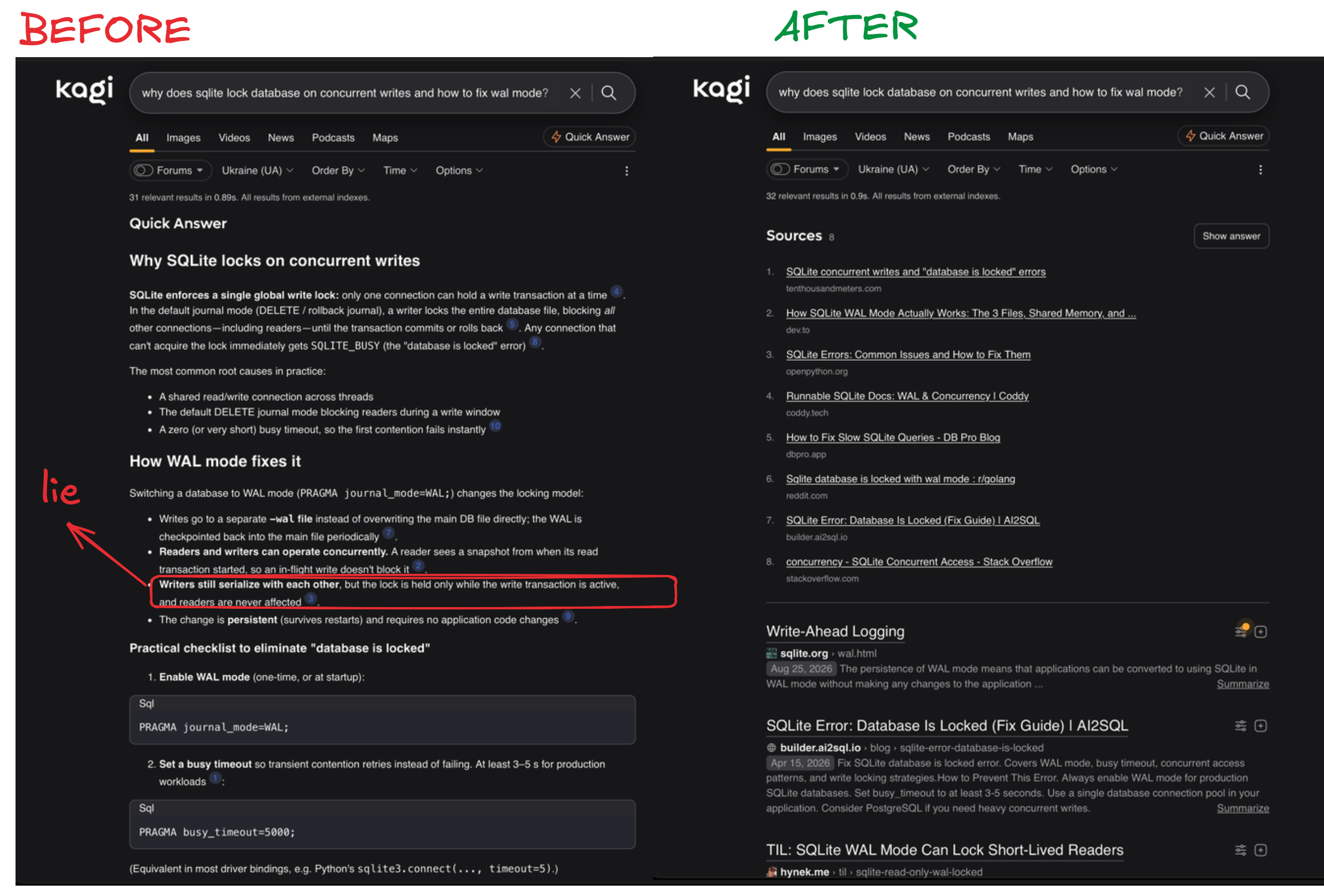
Proposed Solution
Add an optional "Sources Only" mode (or a "Collapse AI answer text by default" toggle) in Settings → AI.
How it would work:
- When Quick Answer is triggered (via ? or the button), the LLM still runs behind the scenes to identify, filter, and rank the highest-signal sources for the query.
- The generated text summary is hidden/collapsed by default—immediately presenting a clean, numbered list of the cited primary sources.
- A Show answer / Hide answer button remains right next to the header so the user can expand the AI summary on demand with a single click.
Having this built natively would also bring it to mobile browsers and Safari without needing extensions.
Why This Matters: Philosophy & Psychology
Hi everyone! I recently switched to Kagi because I was exhausted by Google’s AI Overviews. I read your AI Integration Philosophy doc and completely agree with it especially the point about LLMs confabulating facts and lacking any true understanding of ground truth.
I realized I was developing a subtle addiction to AI summaries myself (sound familiar?). I stopped verifying information because it felt "irrational": "Here’s a neat summary, and here are the citations—surely it can't be wrong?" (Spoiler: it can!)
More importantly, automatic AI answers quietly hijack our dopamine loop. You get an instant, confident answer from an "authority" ("Oh, all-knowing AI!"). Previously, finding an answer required searching, reading, and—most critically—verifying, because when you synthesize a conclusion yourself, you naturally stay alert for edge cases. When an AI hands you a polished conclusion, your brain accepts it without resistance, and your own critical thinking muscles slowly atrophy.
In your docs, you state that:
- AI should be used to the extent that it enhances our humanity, not diminish it (AI should be used to support users, not replace them)."
- "A well-designed tool should have features that allow for a seamless transfer of control back to the user."
A "Sources Only" mode turns Quick Answer into a high-precision AI research router: users get the semantic retrieval power of LLMs with zero risk of hallucination, keeping critical verification in human hands.
What Happens Under the Hood
Why is this so much better than just scanning the regular SERP? Let’s look at how Quick Answer actually works (you can verify this in your browser's Network tab):
First, Kagi sends a request to the assistant service:
POST https://assistant-api.kagi.com/mother/context
The payload (request.postData.text) contains query, answer_box, and items (35 search results). Here is an example item sent in:
{
"title": "How to Get Free Checked Bags on Airlines",
"url": "https://www.nerdwallet.com/travel/learn/airlines-with-free-baggage",
"snippet": "These airlines allow free carry-on bags, even in basic economy: Alaska Airlines: All travelers can bring one carry-on bag in the cabin plus ...",
"rank": 5
}
Then the magic happens, and the response returns output_data.references containing just 4 items the exact sources the AI actually relied on:
{
"title": "How to Get Free Checked Bags on Airlines",
"url": "https://www.nerdwallet.com/travel/learn/airlines-with-free-baggage",
"is_search_result": true
}
Quick Answer takes 35 links as input and narrows them down to 4. Under the hood, the LLM acts as a high-precision semantic filter tailored to the exact query. Look at the comparison from that real request:
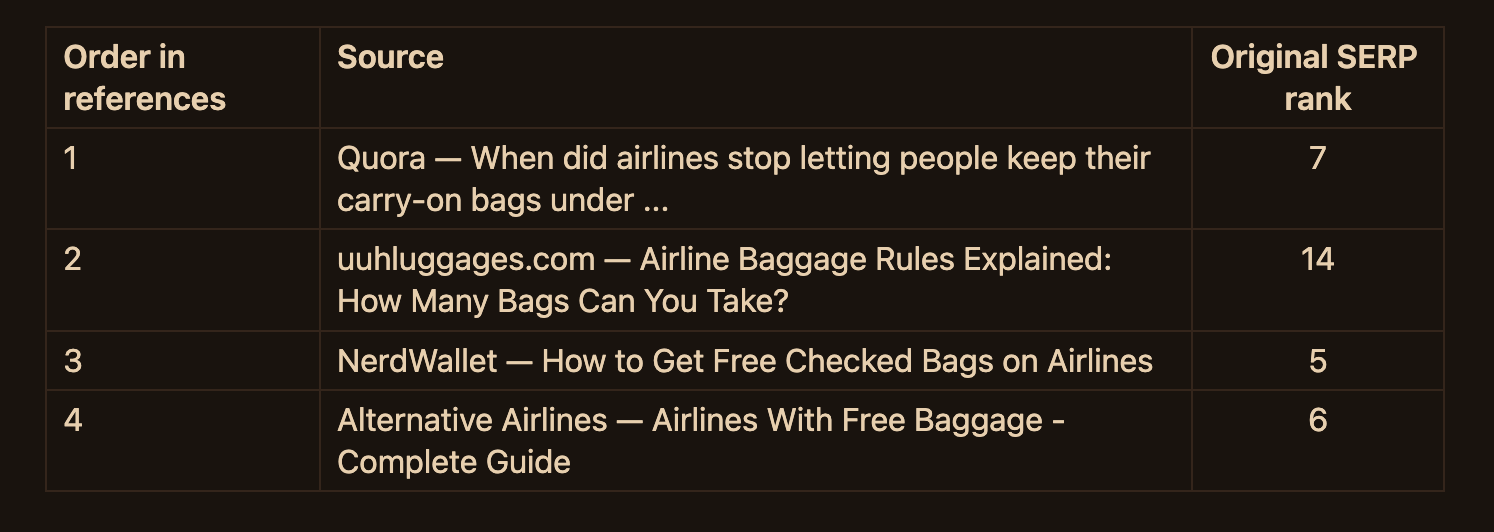
As you can see, the AI doesn't just grab the top 3 links from the SERP it surfaces relevant answers buried at rank 7 and rank 14.
(Note for moderators/admins: I wasn't sure if posting external links to GitHub is allowed here, If external repo links are okay, let me know and I'll gladly drop the link in the replies!)
How a user interacts with it:
- The user enables a single toggle in settings if they want to see links only by default.
- When Quick Answer is triggered, only the cited links appear; if the user actually needs the generated text for a specific query, they just click a Show answer toggle button right on the card to expand it.
Examples in other products:
I haven't seen this exact pattern implemented natively in any major search engine or browser—only custom userscripts and extensions that completely disable or strip out AI blocks altogether.
How it integrates into Kagi:
Just add a simple, standalone "Sources Only Quick Answers" toggle in Settings → AI, keeping all existing Quick Answer triggers (?, button, or q shortcut) exactly as they are.
