Summary:
Introduce a quick-action shortcut when highlighting text directly inside Kagi Assistant's own text outputs (e.g., "Ask") to seamlessly query or reply to a specific snippet.
Current Limitation:
When reviewing a response from Kagi Assistant, if a user wants to drill down into a specific claim, sentence, or term mentioned in the model's output, they have to manually copy the text, clear or open a new prompt, and paste it back in with a follow-up question.
Impact on Workflow:
Adding a contextual action right on text selection within Assistant responses would drastically speed up iterative research, making it trivial to quote, question, or cross-reference specific parts of an AI-generated answer.
Ratik's reply and recommendation for a new post, for reference
Screenshot (web, desktop)
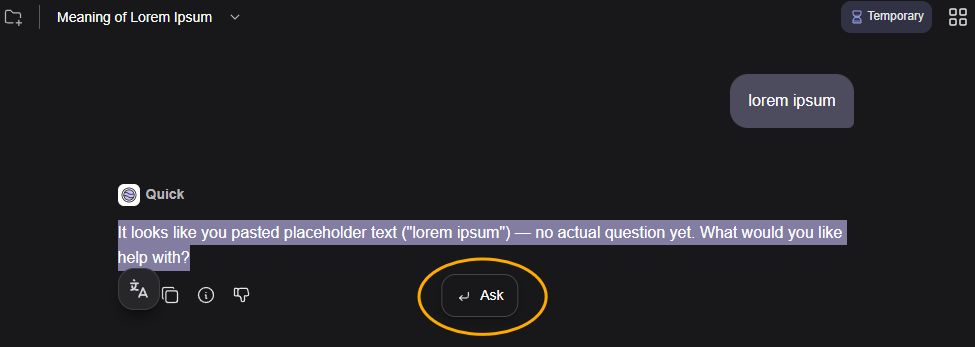
Use Case / User Flow:
- The user highlights a specific sentence, phrase, or data point inside a response generated by Kagi Assistant.
- A floating context menu or quick popup appears next to the selection with options like "Ask Assistant about this" or "Search this".
- Tapping it instantly triggers a follow-up prompt or query pre-populated with the selected text or formatted as a quote/citation block for the next turn.
Precedents / Inspiration:
- Advanced reading and chat interfaces often allow users to highlight parts of an AI's response to instantly "quote" or "ask about this snippet," keeping the conversation context tight and friction-free.
- Bringing this to Kagi Assistant would make conversational research much more fluid, especially when dealing with complex, multi-paragraph technical answers.
