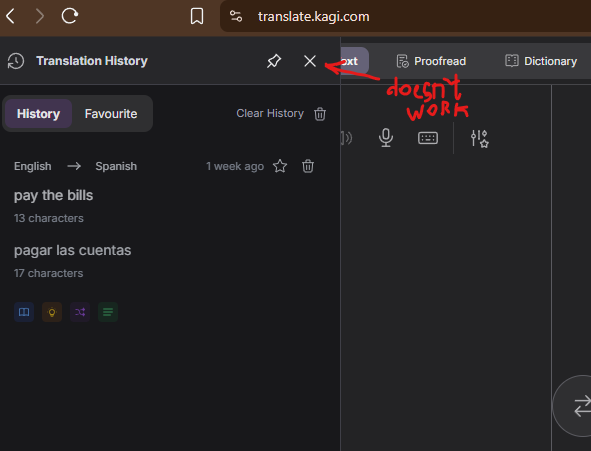
I've run into an issue with Kagi Translate that started around a month ago. When I open https://translate.kagi.com/, the Translation History sidebar is permanently open on the left side. Clicking the X button has no effect, so I can't hide the panel. I've attached a screenshot showing the issue.
Environment
- OS: Windows 11
- Browser: Brave 1.92.134 (Official Build) (64-bit)
- Chromium: 150.0.7871.63
What I've tried (none of these helped)
- Cleared cache and site data
- Logged out and back in
- Restarted the browser many times
Interestingly, the exact same account works correctly in a fresh installation of Google Chrome on the same machine, so this seems to be Brave-specific (or something related to Brave compatibility). The issue started only recently; previously everything worked as expected.
If there's any additional information or browser logs I can provide to help diagnose this, I'd be happy to help. Thanks!
Expected behavior: clicking the X should close the Translation History panel.
Actual behavior: the X button appears clickable but does nothing, leaving the history panel permanently visible.
