- Open Kagi translate in Firefox (desktop).
- Select English-to-Japanese translation.
- On the left translation pane (English), enter a common phrase to translate.
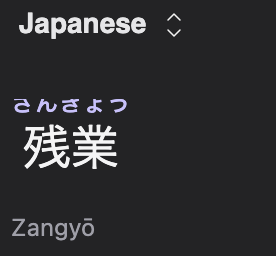
- On the right translation pane (Japanese), enable furigana.
- See that the top-half of all furigana above the kanji characters is hidden.
This occurs in Firefox desktop browser on both Mac OS and Windows 11. I did not observe this issue in Safari. I do not use any other browsers.
Furigana text is fully visible.
